
SOLIDWORKS AURA: AI-Powered Context and Design Assistant for Engineering Teams
How much time do your engineers waste navigating menus, searching for assembly information, and trying to remember why certain design decisions were made three months ago? If you're running an engineering organization, you already know the answer is too much. The administrative overhead often pulls your team away from actual engineering work.
SOLIDWORKS AURA is the answer to this productivity drain. Launched in 2025 and available now withing your design window, AURA is an AI-powered assistant that fundamentally changes how engineers interact with their SOLIDWORKS environment. Instead of clicking through property panels and dialog boxes, your team can simply ask questions and issue commands in plain English.
What Is SOLIDWORKS AURA?
SOLIDWORKS AURA is an AI assistant that serves as the context coordinator for your SOLIDWORKS Design projects. Think of it as the team member who never forgets project details, always remembers why decisions were made, and can instantly surface information that would normally require extensive searching through files and documentation.
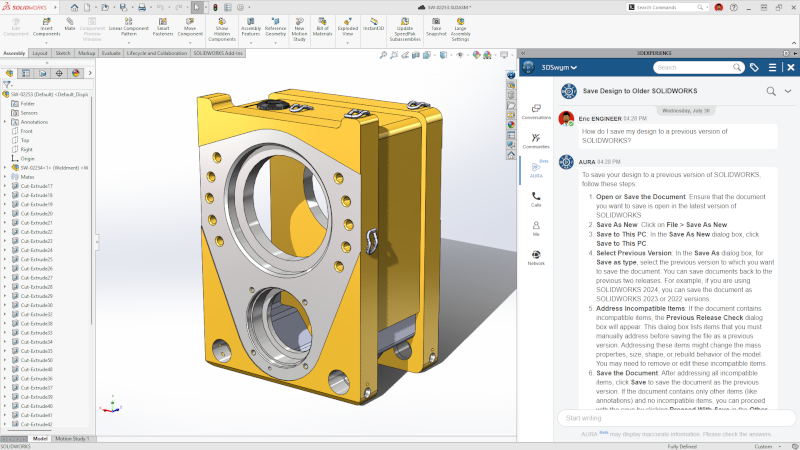
Unlike generic AI chatbots that lack engineering context, AURA understands SOLIDWORKS workflows, CAD terminology, and design processes. It operates directly within your SOLIDWORKS environment through the 3DSwym app, maintaining awareness of your current project state, design history, and objectives. This contextual understanding means AURA provides relevant assistance rather than generic responses that engineers must then translate into actionable steps.
AURA is built on the Mistral AI foundational model but hosted on Dassault Systèmes' Outscale cloud infrastructure.
This architecture ensures your proprietary designs and innovative concepts remain within Dassault Systèmes' security perimeter, subject to the same confidentiality standards as your existing SOLIDWORKS files. Your engineering IP stays protected while you gain AI-powered capabilities.
How Does AURA Work in Your SOLIDWORKS Workflow?
SOLIDWORKS AURA integrates directly into your design environment powered by the 3DEXPERIENCE platform. Engineers access AURA through the 3DSwym app, which appears in the left-hand column of their SOLIDWORKS interface. Once connected, AURA maintains awareness of the current design context, understanding which assembly is open, what modifications have been made, and the project's overall objectives.
The interaction model is conversational. Instead of memorizing command sequences or navigating nested menus, engineers type or speak natural language queries. "Which parts in this assembly are made of aluminum?" "Show me all components that need tolerance review." "What materials did we use in the previous version of this design?" AURA processes these questions, accesses the relevant SOLIDWORKS data, and provides immediate answers.
Beyond answering questions, AURA can execute commands across your SOLIDWORKS assemblies. "Update all steel components to use grade 304 stainless." "Apply the revised tolerance specifications to fasteners." What would traditionally require clicking through properties for dozens of individual parts happens through a single text command. The time savings compound quickly when these operations occur multiple times daily across your engineering team.
What are the Key Capabilities of SOLIDWORKS AURA?
SOLIDWORKS AURA delivers several capabilities that directly address common engineering productivity bottlenecks. The natural language query system lets engineers ask questions about their assemblies without knowing exactly where information lives in the SOLIDWORKS interface. How many parts are in the current assembly? Which components exceed the weight budget? What's the total material cost? AURA surfaces this information instantly.
The context awareness goes deeper than simple data retrieval. AURA maintains understanding of design intent throughout a project's lifecycle. When an engineer asks why a particular material was chosen or what constraint drove a specific dimension, AURA can reference prior decisions and the reasoning behind them. This institutional knowledge preservation becomes particularly valuable when team members transition between projects or when new engineers join ongoing work.
AURA's ability to execute broad changes through text commands transforms tedious administrative tasks. Updating materials across an assembly, applying revised specifications to component categories, or modifying properties based on new requirements—operations that traditionally consume significant engineering time—become simple conversational exchanges. The SOLIDWORKS assistant handles the mechanical execution while engineers focus on the decisions themselves.
Private ideation represents another significant advantage of SOLIDWORKS AURA. When engineers explore design alternatives or search for inspiration, those queries remain within Dassault Systèmes' secure environment. Unlike web-based AI tools where searches might expose your innovation direction to competitors, AURA keeps exploratory work confidential. Your team can iterate freely without inadvertently signaling your product roadmap to the market.
What’s the Business Impact of SOLIDWORKS AURA?
The value proposition of SOLIDWORKS AURA centers on time reallocation. Engineering teams spend considerable time on information retrieval, property updates, and documentation—tasks that don't directly advance design objectives but are necessary for project execution. When an engineer needs to identify all components meeting certain criteria, the traditional SOLIDWORKS approach means manually checking properties across potentially hundreds of parts. AURA reduces this to a single query.
Consider the cumulative effect across a typical engineering organization. If each engineer saves just 45 minutes daily through faster information access and automated property updates, that's nearly four hours per week per person. For a team of ten engineers, you're reclaiming the equivalent of a full-time employee's worth of productivity—without hiring, onboarding, or additional overhead costs.
Beyond direct time savings, AURA reduces the friction that disrupts engineering focus. Context switching—the mental cost of moving between design work and administrative tasks—diminishes when information retrieval becomes conversational rather than procedural. Engineers maintain flow state longer, producing higher quality work and finding solutions more efficiently.
The institutional knowledge preservation delivers long-term value that's harder to quantify but equally significant. When experienced engineers leave or move to new projects, their accumulated understanding of why designs evolved certain ways typically leaves with them. AURA captures this context, making it accessible to whoever picks up the work next. The ramp-up time for new team members decreases substantially when they can ask AURA about design history rather than reconstructing it from incomplete documentation.
How Can I Get Started with SOLIDWORKS AURA?
SOLIDWORKS AURA is available now for named user SOLIDWORKS customers through the 3DEXPERIENCE platform. Implementation requires ensuring your team uses named user SOLIDWORKS licenses, previously called SOLIDWORKS Connected (or 3DEXPERIENCE SOLIDWORKS).This licensing model provides the integration points AURA needs to maintain context awareness across your SOLIDWORKS environment. The more of your data you have saved, the more design context Aura has to help your team get it right so you want to ensure you are uploading your data.
Engineers access AURA through the 3DSwym app within SOLIDWORKS or via web browser. The assistant appears in the left-hand column, ready to respond to queries without requiring extensive configuration or training. The natural language interface means your team can begin using AURA productively within minutes rather than investing weeks in formal training programs.
At SWYFT Solutions, we help engineering organizations implement SOLIDWORKS AURA strategically. Rather than simply enabling the feature and hoping engineers adopt it, we work with teams to identify which workflows will benefit most from AI assistance, develop adoption strategies that build internal expertise progressively, and measure whether promised productivity gains actually materialize in your specific environment. Our founder's background running an engineering firm means we understand the difference between technology that sounds impressive and capabilities that genuinely transform daily work.
What is AURA's Role in the Broader AI Assistant Ecosystem?
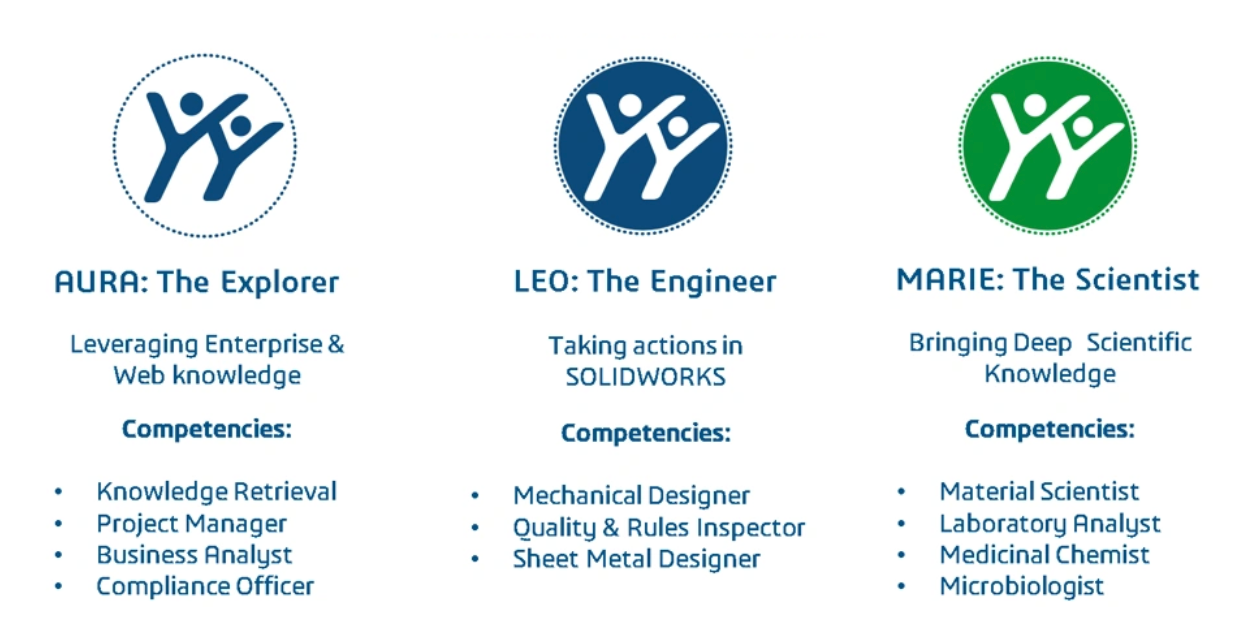
SOLIDWORKS AURA is the first of three specialized AI assistants Dassault Systèmes is deploying. While AURA focuses on context coordination and conversational interaction with your SOLIDWORKS designs, two additional assistants will arrive in 2026 to address complementary aspects of the engineering workflow.
LEO, launching mid-2026, will bring engineering feasibility checking and manufacturing constraints to your SOLIDWORKS environment. When AURA helps you explore design possibilities, LEO will evaluate whether those options are actually buildable given your manufacturing capabilities. MARIE, arriving later in 2026, will add materials science expertise to support scientifically-grounded material selection decisions.
The three assistants work together as specialized team members, each contributing domain expertise. AURA maintains the conversational interface and project context that connects everything. This architecture means you're not adopting a single monolithic AI tool that tries to do everything adequately—you're building a team of focused assistants that excel at specific aspects of SOLIDWORKS design work.
What Are Real-World Scenarios with AURA in Action?
Consider an engineering team approaching a critical design review. The project manager needs to verify that all components meet updated cost targets before the meeting. Traditionally, this means an engineer spending hours checking part properties, compiling a spreadsheet, and highlighting exceptions. With SOLIDWORKS AURA, the query happens conversationally: "Which components exceed the cost target we set last month?" AURA identifies the parts instantly, enabling the team to address issues before the review rather than discovering them during it.
Or imagine an engineer inheriting a complex assembly from a colleague who moved to a different project. Understanding why certain design decisions were made—why this particular fastener was specified, why these tolerances were tightened, why this material was selected—typically requires diving through revision history, design documentation, and email threads. AURA provides this context immediately, answering questions about design rationale without requiring archaeological expeditions through project archives.
When supply chain disruptions force material substitutions, AURA transforms a tedious update process into a simple command. "Replace all instances of aluminum 7075 with 6061 throughout the assembly." What would traditionally mean tracking down every affected part and updating properties individually happens through one instruction. Your team spends time evaluating the engineering implications of the substitution rather than executing the mechanical updates.
Why Does SWYFT Solutions Recommends SOLIDWORKS AURA?
SWYFT Solutions was founded by a team who spent years managing engineering teams working in SOLIDWORKS. We understand the daily frustrations that AURA addresses because we’ve lived them.
This perspective shapes our approach to SOLIDWORKS AURA implementations. We're not interested in adding technology for technology's sake. We focus on whether AURA will actually solve the specific productivity problems your engineering organization faces. Does your team spend significant time on assembly queries that AURA could handle conversationally? Do you lose institutional knowledge when people transition between projects? Are property updates consuming engineering time that could be automated?
When the answer to these questions is yes, SOLIDWORKS AURA delivers measurable value. When it's not the right fit, we'll tell you. Our job is helping engineering organizations make informed decisions about SOLIDWORKS technology investments, not maximizing software sales.
Evaluating SOLIDWORKS AURA for Your Team
Understanding whether SOLIDWORKS AURA makes business sense for your organization requires examining your specific workflows, team structure, and current productivity challenges. The value proposition varies significantly based on assembly complexity, team size, and how your engineers currently interact with SOLIDWORKS.
SWYFT Solutions provides detailed assessments of how SOLIDWORKS AURA aligns with your engineering environment. We analyze which workflows would benefit most from conversational AI assistance, identify potential adoption challenges, and develop implementation strategies that deliver measurable productivity improvements rather than just adding new features to your SOLIDWORKS stack.
SOLIDWORKS AURA represents the beginning of a fundamental shift in how engineers interact with CAD software. By bringing conversational AI assistance directly into the SOLIDWORKS Design environment, Dassault Systèmes is addressing productivity bottlenecks that have frustrated engineering teams for years. For organizations ready to move beyond traditional workflows, AURA offers measurable time savings and the competitive advantages that come from letting engineers focus on engineering rather than administrative overhead.